Personas
A persona is a role: a set of permissions that decides what a teammate can see and do. You create one by starting from a SKYXOPS template and tuning the checkboxes. Every user is assigned exactly one persona in Users & Access.
Personas are recorded and logged, but not yet enforced. Ticking or clearing a permission doesn't grant or block anything until SKYXOPS turns enforcement on. Design your roles now; they take effect when it's switched on. See Users & Access for what this means for offboarding.
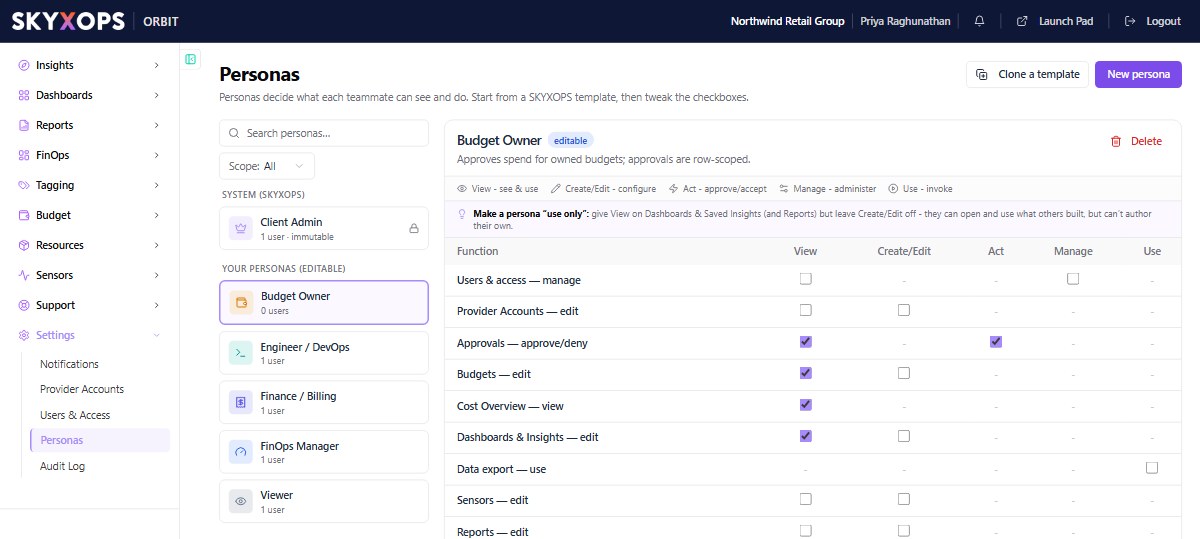
System vs your personas
System (SKYXOPS) personas, such as Client Admin, are templates. Some are immutable (you can't edit them, only clone).
Your personas are editable roles you create, such as Budget Owner, Engineer / DevOps, Finance / Billing, FinOps Manager, or Viewer.
Create a role (persona)
- Open Settings > Personas.
- Choose Clone a template (start from a SKYXOPS role) or New persona (start fresh).
- Give it a name and description.
- Set its permissions in the matrix (below).
- Save. It's now available to assign in Users & Access.
The permission matrix
Each persona is a grid of functions (Cost Overview, Budgets, Provider Accounts, Sensors, Users & access, …) against five permission verbs:
| Verb | Meaning |
|---|---|
| View | See & use |
| Create/Edit | Configure |
| Act | Approve / accept |
| Manage | Administer |
| Use | Invoke |
Tick the boxes to grant exactly what a role needs. For example, a Budget Owner can view Cost Overview and Dashboards, edit Budgets, and approve spend, but not manage users.
Grant View on Dashboards & Saved Insights (and Reports) but leave Create/Edit off. People can open and use what others built without authoring their own.
Assign a persona
You assign personas to people in Users & Access. Each user gets one persona.
FAQ
Why start from a template?
Templates encode sensible defaults for common roles, so you only need to tune them.
Can I edit a system persona?
No. Client Admin is the system persona, and it is locked. To get an editable role, clone one of the SKYXOPS templates and adjust it.
Where are persona changes recorded?
In the Audit Log, along with every access decision.