Provider Accounts
Settings > Provider Accounts is the screen where you connect cloud accounts and keep an eye on them. It's the entry point for the connect flows. It's also the place where you watch the first-24-hour ingest, re-validate access, and manage connections.
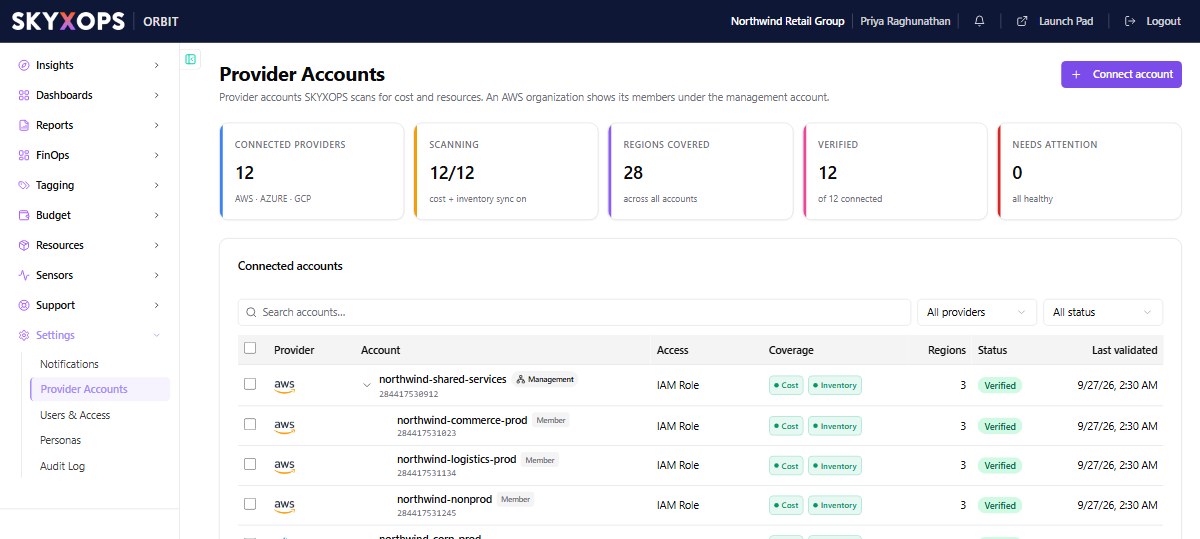
What the page shows
The header KPIs summarize connectivity:
| KPI | What it shows |
|---|---|
| Connected Providers | How many accounts are connected, across AWS / Azure / GCP. |
| Scanning | How many have cost and inventory sync turned on. |
| Regions Covered, Verified | Coverage, and how many connections have passed validation. |
| Needs Attention | Connections with a problem to fix. |
The Connected accounts table lists each account with its Provider, Account (name and id), Access method (IAM Role for AWS, Service Principal for Azure, Service Account for GCP), Coverage (Cost / Inventory), Regions, Status, and when it was Last validated. An AWS organization connected at the management account shows its member accounts underneath.
Connecting an account
Choose Connect account to start the guided wizard, then follow the per-provider guide:
Your connection is saved as a draft first. Validation and the first data pull come next.
Reading the status
| Status | Meaning |
|---|---|
| Pending / Draft | Saved, not yet validated. Orbit hasn't confirmed it can read the account. |
| Verified | Access validated. Cost and inventory are ingesting. |
| Needs Attention | Validation failed or access broke. Open the account to see why and re-validate. |
First data appears within about 24 hours of a connection being verified. Inventory populates on the same daily cycle, so expect the account (and any boards that depend on it) to be empty until then.
Managing a connection
Open an account row to see its Overview, Access & validation, and Configuration panels. From there you can Re-validate after fixing access (e.g. a rotated key or changed IAM role), Edit the connection's settings, or Delete the connection to stop scanning that account.
FAQ
My account is stuck on "Pending".
Orbit hasn't been able to validate access yet. Re-check the role/principal/service-account you created against the connect guide for your provider, then re-validate.
I connected an account but see no data.
First ingest can take up to 24 hours after validation. Confirm the account shows Verified and that its cost export (S3, blob storage, or BigQuery) is delivering. See your provider's connect guide.
Do I add every member account?
No. Connect an AWS organization (or Azure tenant / GCP org) at the top level and Orbit discovers the members automatically.