Virtual Tags
Raw cloud tags are messy. One team writes environment, another writes Environment, a third writes env, and a fourth forgets entirely. Across AWS, Azure, and GCP the same idea shows up under a dozen different keys, so you can't cleanly answer "how much did Production cost?"
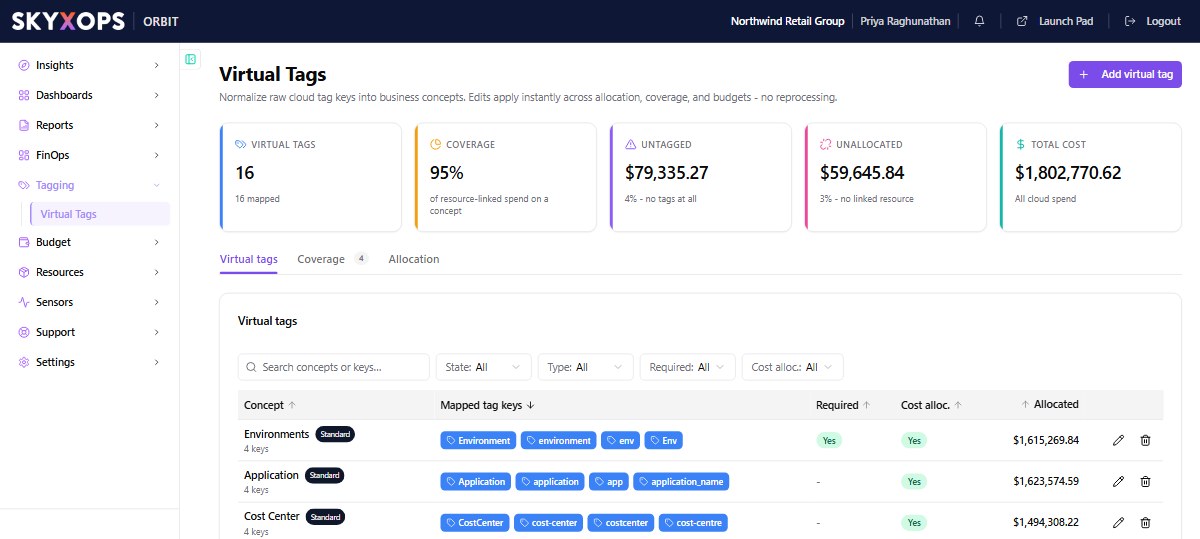
Virtual Tags fix this. They map your raw, inconsistent tag keys onto clean business concepts (Environment, Application, Team, Cost Center) without re-tagging a single resource in the cloud. Edits apply instantly across allocation, coverage, and budgets, with no reprocessing.
How a Virtual Tag works
A Virtual Tag is a concept plus the raw tag keys that map to it. Think of it as a funnel: spend flowing in under any of the mapped keys comes out attributed to the single concept.
For example, an Environments concept might map environment, Environment, skyxops-env, env, and rnd. All of them then roll up to one clean dimension you can break down and budget by.
The page header KPIs tell you how healthy your tagging is:
| KPI | What it shows |
|---|---|
| Virtual Tags | How many concepts exist, and how many are mapped. |
| Coverage | The share of resource-linked spend that resolves to a concept. |
| Untagged | Spend with no tags at all. |
| Unallocated | Spend not yet linked to a resource. |
| Total Cost | All cloud spend in scope. |
Working with Virtual Tags
The page has three tabs:
| Tab | What it does |
|---|---|
| Virtual tags | The concept list: each concept, its mapped keys, whether it's required, and how much cost it allocates. |
| Coverage | How completely each concept is populated across your spend. |
| Allocation | How spend is split across a concept's values, including shared-cost reallocation. |
To create or edit a concept, use + Add virtual tag (or the edit control on a row), then add the raw keys that should map to it. Mark the concepts that matter as required so they're tracked in coverage reporting.
Where Virtual Tags show up
Once defined, Virtual Tags are available everywhere:
- as a break-down and filter in Explore;
- as the basis for chargeback and showback;
- as the scope for Budgets;
- as the coverage tracked on the Cost Overview and companion FinOps boards.
FAQ
Do Virtual Tags change my cloud resources?
No. They're an Orbit-side mapping. Nothing is written back to AWS, Azure, or GCP.
If I add a mapping, do I have to wait for a reprocess?
No. Changes apply instantly across allocation, coverage, and budgets.
What's the difference between "untagged" and "unallocated"?
Untagged spend has no tags at all; unallocated spend isn't linked to a resource. Both are surfaced as KPIs so you can close the gaps.