Recommendations
Recommendations are the cost-saving opportunities your Sensors found across your connected clouds, ranked by monthly savings. Open any finding to see exactly why it was flagged and how to remediate it.
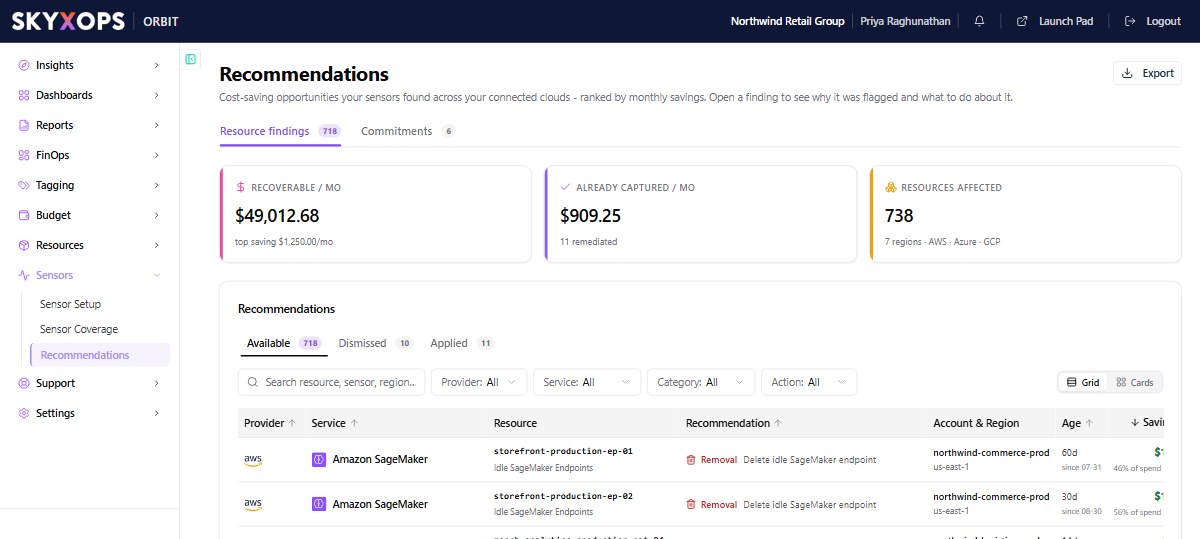
The list
Header KPIs frame the opportunity:
| KPI | What it shows |
|---|---|
| Recoverable / mo | Total monthly savings across open findings. |
| Open Recommendations | The count, and the single biggest. |
| Already Captured / mo | Savings from findings already remediated. |
| Resources Affected | How many resources, across how many regions and clouds. |
Each row shows the Provider, Service, affected Resource, the Recommendation (e.g. delete unused AMI, migrate gp2 to gp3), the Account & Region, the finding's Age, the Savings / mo (and annualized), and its Status. Filter by provider, service, category, action, or status; switch between grid and cards; or Export the list.
Anatomy of a recommendation
Open a finding to reveal its detail drawer. Every recommendation uses the same structure, so you always know where to look:
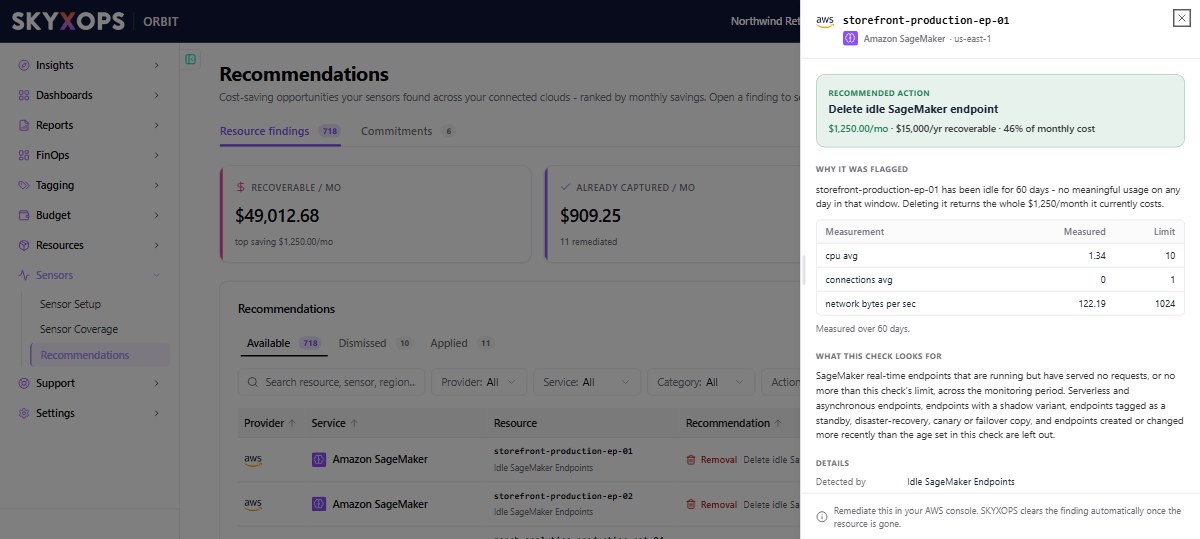
| Section | What it tells you |
|---|---|
| Recommended action | The fix, with $/mo and $/yr recoverable. |
| Why it was flagged | The specific evidence for this resource (e.g. "averaged low utilization for 21 days"). |
| What this check looks for | The sensor's detection criteria in plain language, e.g. "account-owned AMIs that no instance and no launch-template version references", with public and backup-created images excluded. |
| Details | Detected by (sensor), Category, Status, Recommendation id, Provider Account, Region, and First detected date. |
A footer notes where to remediate. For example: "Remediate this in your AWS console. SKYXOPS clears the finding automatically once the resource is gone."
Acting on a recommendation
- Review the evidence and the detection criteria.
- Remediate in your cloud console (or your IaC pipeline).
- Orbit re-scans daily and clears the finding once the resource is fixed or gone. The savings then move from recoverable to captured. See Understanding Savings.
FAQ
Does Orbit change my resources for me?
No. Recommendations are read-only findings; you remediate in your own console or pipeline. Orbit verifies the result on its next daily scan.
Why did a recommendation disappear?
Either the resource no longer meets the sensor's criteria, so the finding cleared on its own, or someone snoozed or dismissed it. Snoozed and dismissed recommendations are in the Dismissed list, where you can restore them.
How is the savings figure calculated?
From the resource's effective cost and the specific waste the sensor detected. Estimated savings become realized only after remediation. See Understanding Savings.