Inventory (CMDB)
Inventory is Orbit's CMDB: a live record of every resource across your connected clouds, with cost and tags attached. It answers what do we actually run, and what does each thing cost?
Under the hood, Inventory is a standard Saved Insight called Resources (CMDB) built on the Cloud Resource Inventory dataset, so it behaves like any other Explore view. You can filter, group, and drill.
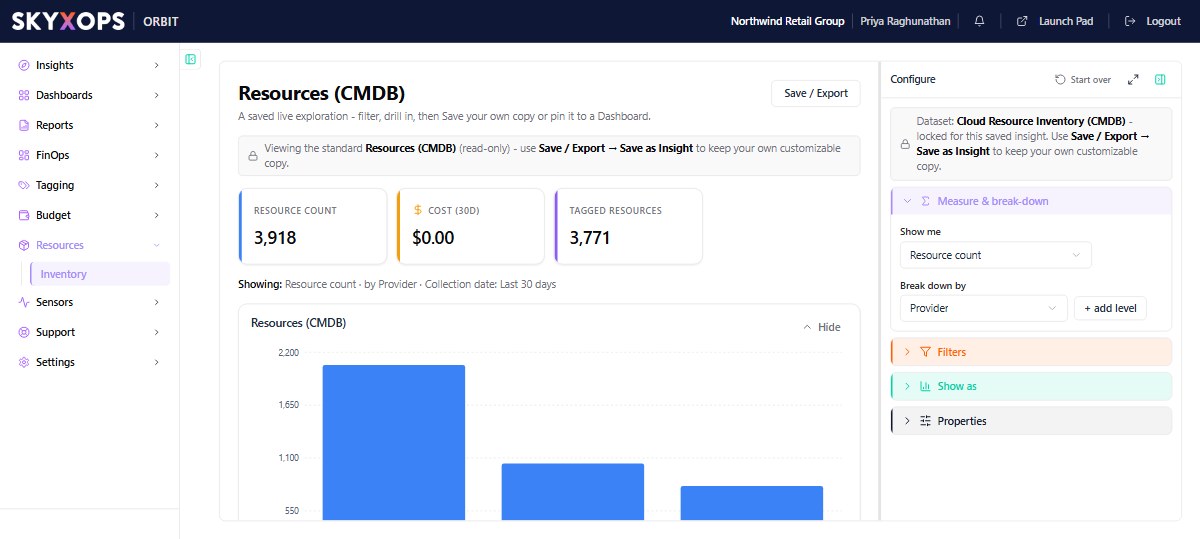
What's in the view
- KPIs that show total Resource Count, Cost (30D), and how many resources are Tagged.
- A break-down (by provider, service, region, account, or Virtual Tag) rendered as a chart and a records grid.
- Server-side search and pagination across the full inventory.
Drilling into a resource
Select any resource to open its detail view, which shows:
- resource properties and metadata;
- its tags (raw and mapped Virtual Tags);
- a cost panel with what the resource has cost.
Make your own copy
The standard Resources (CMDB) view is read-only. Use Save / Export > Save as Insight to keep a customizable copy (for example, filtered to one provider or grouped by team) and pin it to a Dashboard.
FAQ
Is this a separate database I maintain?
No. Inventory is generated from the resource data Orbit ingests from your clouds; it refreshes daily.
Why is a resource untagged here but tagged in the console?
Check your Virtual Tag mappings. The raw key may not yet map to a concept.