Sensor Setup
A Sensor is a detector SKYXOPS runs every day against your connected clouds to find cost-optimization opportunities. Sensor Setup is the catalog: every sensor, what it detects, and its live impact.
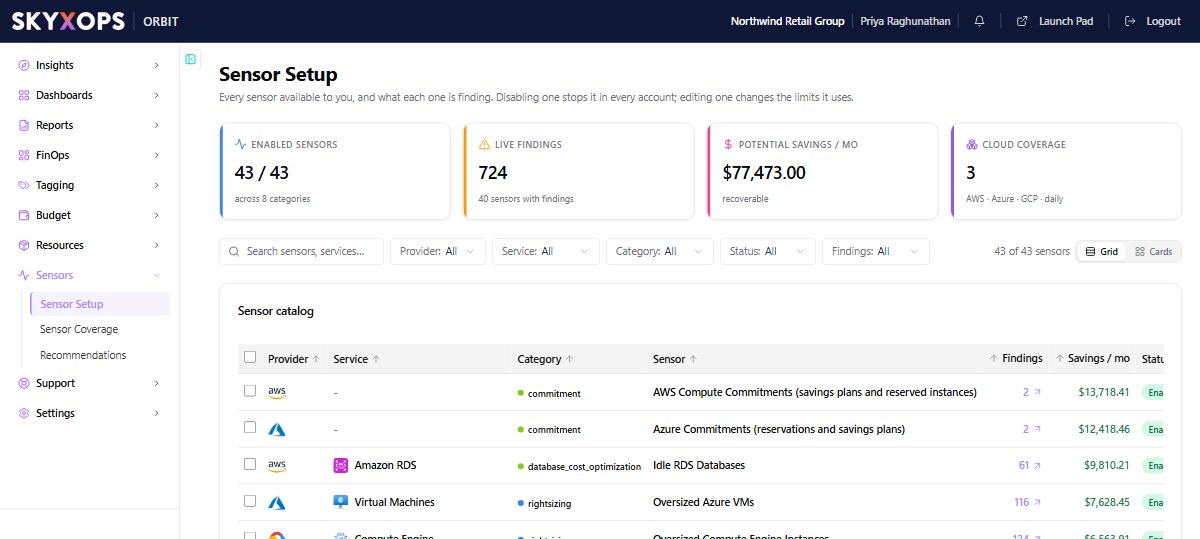
The catalog
The header KPIs summarize your detection coverage:
| KPI | What it shows |
|---|---|
| Enabled Sensors | How many are on, across how many categories. |
| Live Findings | Open opportunities right now, and how many sensors are firing. |
| Potential Savings / mo | Total recoverable amount, updated daily. |
| Cloud Coverage | Which providers are scanned (AWS, Azure, GCP) and on what schedule. |
Below, the sensor catalog lists each detector with its Provider, Service, Sensor name, Category (such as Storage, Migration, Network, or Compute), a plain-language What it detects, its Schedule (daily), and its current findings count. Filter by provider, service, category, or status, and switch between grid and card layouts.
What a sensor documents
Each sensor publishes its detection criteria, which state exactly what it looks for. For example, the Unused AMIs sensor finds "account-owned AMIs referenced by no instance and no launch-template version" while protecting AWS Backup and public AMIs. That criteria is the bridge between a Sensor (the detector) and a Recommendation (what it found).
From setup to savings
- Sensors run daily and generate findings.
- Findings become ranked Recommendations.
- You act on them, and Orbit tracks the result. See Understanding Savings.
FAQ
Can I turn sensors on or off?
Yes. Use the switch on a sensor's row, or select several sensors and choose Enable or Disable. Disabling a sensor stops it in every account. To switch a sensor off for some accounts only, use Sensor Coverage. Changing sensors needs the Create/Edit permission on Sensors.
How often do sensors run?
Daily, against every connected cloud.