Budget details and alerts
Every budget has its own page. It shows how the budget is doing, what it covers, and who owns it. The budget form is where you set the alert thresholds and choose who is emailed.
Open a budget from Budget > Budgets, then click the budget in the list.
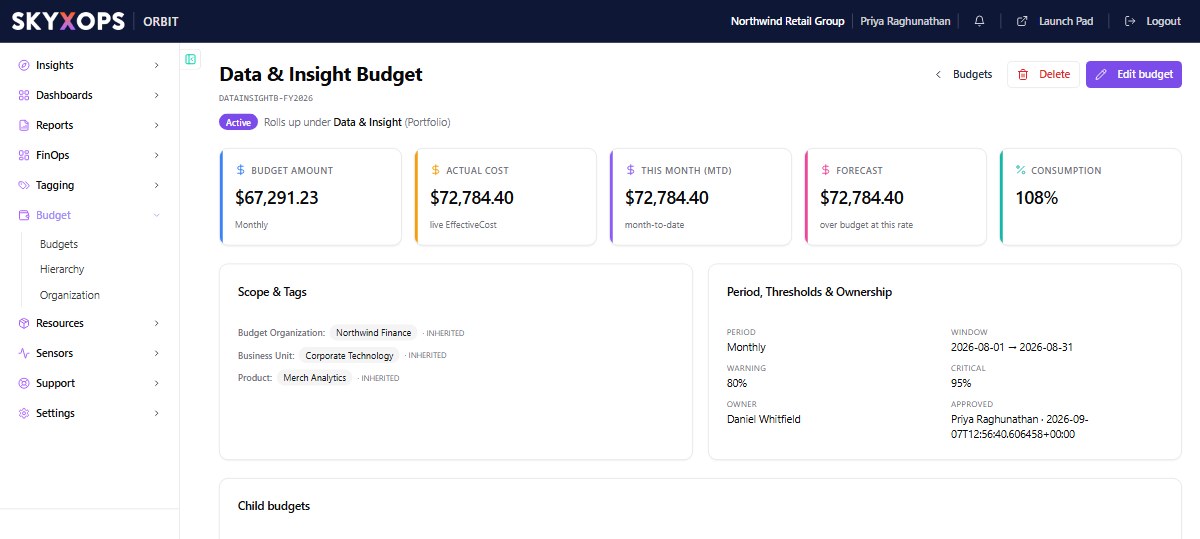
What the page shows
Five tiles sit at the top:
| Tile | What it shows |
|---|---|
| Budget amount | The amount and its period, for example Monthly. |
| Actual cost | Spend so far, from live effective cost. |
| This month (MTD) | Spend in the current month to date. |
| Forecast | Where spend is heading at the current rate. |
| Consumption | Actual cost as a percentage of the budget. |
When other budgets sit below this one, three more tiles appear:
| Tile | What it shows |
|---|---|
| Own pool | This budget's own amount. |
| Allocated to children | The total of the budgets below it. |
| Available | The pool minus what is allocated. It turns red when the budgets below add up to more than the pool. |
Below the tiles:
| Section | What it shows |
|---|---|
| Scope & Tags | What the budget covers. Tags that come from the organization tree are marked as inherited. |
| Period, Thresholds & Ownership | The period and its dates, the warning and critical thresholds, the owner, and who approved the budget and when. |
| Child budgets | The budgets placed below this one for the period. Click one to open it. |
Three actions are at the top of the page:
| Action | What it does |
|---|---|
| Edit budget | Opens the budget form. |
| Delete | Deletes the budget, after you confirm. |
| Approve | Approves a budget that is waiting for approval. It appears only while the budget is pending. |
Alert thresholds
Each budget has two thresholds. You set them in the budget form, under the budget period.
| Field | Meaning | Starting value |
|---|---|---|
| Warning threshold | An alert is sent when actual cost reaches this percentage of the budget. | 80 |
| Critical threshold | A critical alert is sent at this percentage. | 95 |
Both must be between 0 and 100, and the critical threshold cannot be lower than the warning threshold.
The thresholds also set the budget's health. Below the warning threshold the budget is healthy. From the warning threshold it is in warning, and from the critical threshold it is critical.
Alert recipients
In the budget form, Alert recipients chooses who is emailed when the budget crosses a threshold.
- If you pick people, only they are emailed.
- If you leave it empty, the alert goes to the budget owner.
The list offers only people who can see budgets.
Each person can switch off the budget alert email for themselves in their notification preferences. The alert still appears in their notifications in Orbit. See Notifications.
Who can do what
Editing or deleting a budget needs the Create/Edit permission on Budgets. Approving a budget needs the Act permission on Approvals. See Personas.
FAQ
Who gets the alert if I choose nobody?
The budget owner.
Can the two thresholds be the same?
Yes. The critical threshold must be equal to or higher than the warning threshold.
Why is there no Approve button?
Approve appears only while the budget is waiting for approval, and only for people whose persona can approve.