Budget Hierarchy
Budget Hierarchy (Budget > Hierarchy) rolls budget vs. actual up through the organization tree. The levels are Budget Organization, then Business Unit, then Portfolio, then Product, then Application. You see how your budgets aggregate and where the numbers don't add up, so you don't have to read them one at a time. Actuals are live from your tagged spend.
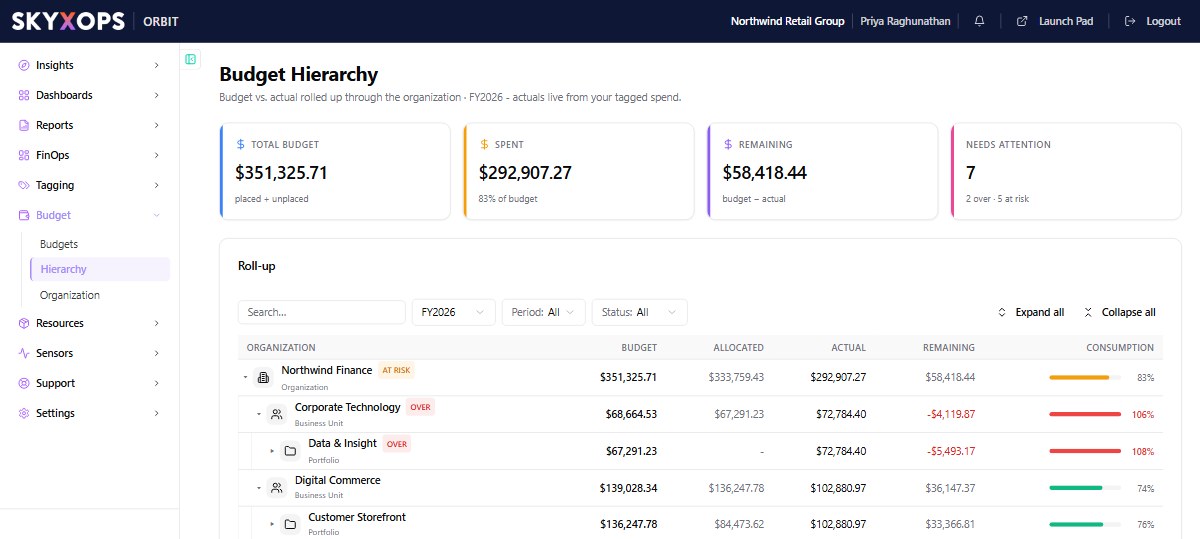
What's on the page
The page shows these KPI cards:
| KPI card | What it shows |
|---|---|
| Total budget | all budget, placed and unplaced |
| Spent | actual to date (with % of budget) |
| Remaining | budget minus actual |
| Needs attention | how many nodes are over or at risk |
The Roll-up table is a tree you can expand and collapse. It has these columns:
| Column | What it means |
|---|---|
| Organization | the node (name and its level: Organization, Business Unit, Portfolio, Product, Application) |
| Budget | the node's own budget pool |
| Allocated | what the node's budgeted descendants draw from that pool |
| Actual | live spend over the node's whole subtree |
| Remaining | budget minus actual |
| Consumption | a health-colored bar (actual ÷ own budget) |
Status flags
| Flag | What it means |
|---|---|
| Over (red) | Actual has reached or passed the budget (consumption ≥ 100%). |
| At risk (amber) | Trending toward over (crossed the warning/critical threshold). |
| Over-allocated (red) | The node's budgeted descendants were given more budget than the node's own pool. This is different from over, which is about actual spend. |
Filters
Scope the view with Search, Fiscal year (FY2026…), Period (Annual, Quarterly, or Monthly), and Status (Over budget or At risk).
If the view mixes budget grains (annual, quarterly, and monthly), Orbit warns that totals aren't directly comparable. Pick a Period to compare like-for-like.
Placed vs unplaced
Budgets attached to a node are placed. Budgets not on any node show in a trailing Unplaced row with their own budget/actual, so nothing is lost. They just don't roll up. Place them by assigning an organization node in the budget's settings.
How the numbers are computed
- Each node's Budget is its own pool (not the subtree sum), so nested pools aren't double-counted. Allocated is what budgeted descendants draw from it.
- The Actual figure is a deduped sum of FOCUS EffectiveCost over the subtree. Each cost row counts once, even under overlapping budgets. It uses EffectiveCost (the amortized basis), never billed cost.
- Only budgets matching the selected fiscal year / period roll up, so the totals share one grain.
- Actuals flow in through each budget's inherited cost scope. The scope is made up of the Virtual Tag (or Provider/Account/Service field) values linked to the nodes on the budget's path.
FAQ
Why is a parent over-allocated?
Its children's budgets sum to more than the parent's own budget pool. Rebalance the children or raise the parent.
Where do actuals come from?
Live from FOCUS EffectiveCost, filtered by each budget's inherited cost scope. This is the same basis as Virtual Tag allocation.
Why does a budget show under "Unplaced"?
It isn't assigned to an organization node. Assign one so it rolls up.